How many Command Dice a player begins the game with depends on the quality of their force, but typically, it will be five. The Army Lists in Section 20, Army Lists, give details for each force including any adjustments made to the Command Dice hand for troop quality.
As the game plays out, players may encounter setbacks that reduce their Force Morale level. The number of Command Dice in their hand at the start of each Phase will be determined by this. As Force Morale decreases, fewer Command Dice will be rolled.
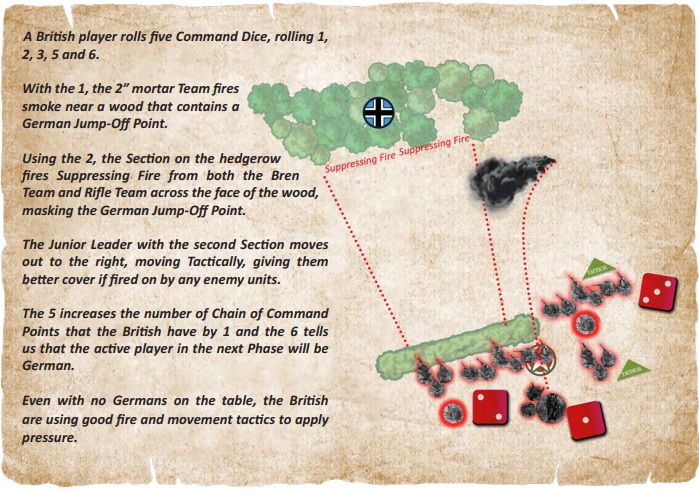
Each dice rolled allows the player to activate Leaders and Units, or generates Chain of Command points that can subsequently be used. As we have seen in Section 6, they also determine which player will be active in the next Phase of play.
| Roll | Result |
|---|---|
| 1 | Activate one Team |
| 2 | Activate one Section |
| 3 | Activate one Junior Leader |
| 4 | Activate one Senior Leader |
| 5 | Add one Chain of Command Point |
| 6 | Turn Sequence |
Two or more Command Dice may be combined to make a higher result. For example, a 1 and a 2 can be combined to make a 3. Dice cannot be combined to make a 5 or 6. Dice cannot be split to make a lower result, nor can a player substitute one score for a different one.
After any Compulsory Activations, the player activates their Units or Leaders in any order they wish. Once the Unit or Leader has been activated, the Command Dice is then discarded.
Other than Compulsory Activations, the player is never obliged to use Command Dice rolls of 1 to 4 and can choose to discard some or all of them. Rolls of 5 or 6 are always applied. See Section 6.2, The Turn Sequence and Section 8, Chain of Command Points.
No Leader or Unit can be activated more than once in a single Phase. Activations normally last for the current Phase; however, Suppressing Fire continues into the following Phase and Units on Overwatch or a Tactical stance can remain so until the end of the Turn, provided they are not activated to do anything else.
Units can be activated by using a Command Dice or when they receive an Order from a Leader.
All figures in a Unit activated with a Command Dice must do the same thing. Where a Unit fires, but some figures do not have Line of Sight to the target, they can move with 1D6 to try to achieve Line of Sight to the target, firing with half their Firepower Dice if they do so.
| Rank | Orders | Range |
|---|---|---|
| Junior Leader | 2 | 6" |
| Senior Leader | 3 | 9" |
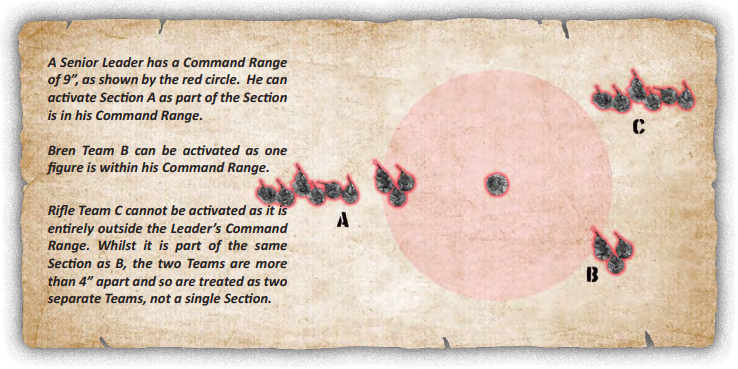
A Junior Leader can only issue Orders to their own Unit. A Senior Leader can issue Orders to any Teams or Sections within their Command Range. No Leader can activate another Leader. Infantry Leaders cannot give Orders to Armoured Fighting Vehicles.
To issue an Order, at least one figure in the Unit must be visible and within the Leader’s Command Range.
Where two (or more) Leaders are within Command Range of a Unit, they can both use their Orders to influence that Unit; however, it may only be activated once in a Phase.
A Scout Team must be armed with the predominant weapon in the Section and may not include an LMG.
The Scout Team will immediately move and will subsequently operate as a single Team. It can rejoin the parent Section by moving to within 4" of the Section or one of its Teams. Rejoining the Section does not require an Order.
When a Team is placed on Overwatch, it can do nothing else in that Phase.
A Team on Overwatch will cover an Arc of Fire of 90° from their position. An Overwatch Marker is placed in front of the Team to show the area they are covering.
Where a Section is one single Unit, rather than being split into multiple Teams, the Section can be put on Overwatch for one Order, but only one Overwatch marker will be placed to indicate its Arc of Fire, the whole section covering that area.
A Team will remain on Overwatch until it moves, fires, goes Tactical, Repositions, the Turn ends, becomes Pinned or it Breaks. When any of those occur, the Overwatch marker is removed.
| In action |
|---|
| A player uses a Command Dice roll of 2 to activate a
Section, moving it towards a farmhouse. Both Teams
move together towards the dwelling, remaining
within 4" of each other.
A second Section is activated by its Junior Leader with a Command Dice roll of 3. The Lieutenant issues two Orders: the LMG Team remains where it is, putting down Suppressing Fire against the farmhouse. The Rifle Team is ordered to move forwards. Using a Leader’s Orders allows more tactical choices to be made, rather than simply moving or firing. |
A Leader can use one Order to do the following without activating the Unit.
If the Unit being rallied is in Line of Sight of the enemy, the Leader must be attached to do this. If the Unit is not in Line of Sight of the enemy, they can be rallied if in the Leader’s Command Range.
This allows the removal of one Team by transferring all of its figures to the other Team. The resulting Team will subsequently activate as a Team, not a Section.
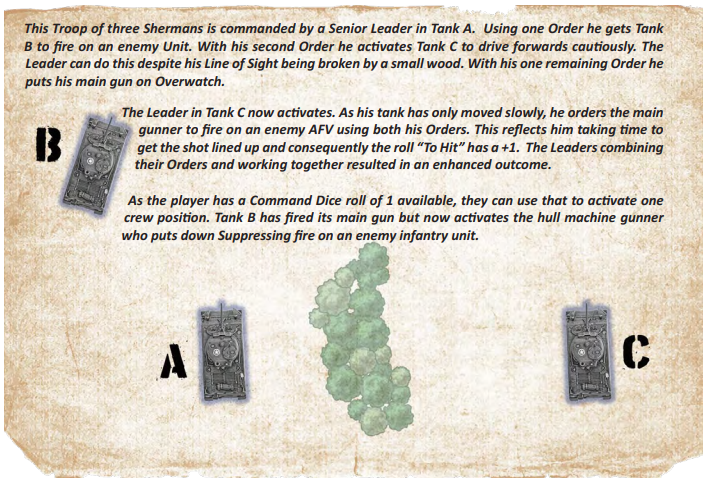
Transport vehicles and Armoured Personnel Carriers activate when their passenger Unit activates, using a Leader’s Order or the Unit’s Command Dice, or by activating individual Crew Positions using a Command Dice roll of 1.
Individual Crew Positions, such as the driver or weapon position, can activate with a Command Dice roll of 1.
A Section mounted in multiple small vehicles, such as motorcycles or Jeeps, activates together on a Command Dice roll of 2, rolling for movement as a whole Section rather than each individual vehicle. If the player chooses to separate them so the vehicles are more than 4" apart, they will activate as individual Teams.
Only one Order can be issued to each vehicle in a Phase, activating one Crew Position. This allows the AFV to move or Fire, but not both.
A Senior Leader cannot rally Shock using the radio net nor can they place Crew Positions on Overwatch.
Only rolls of 1 to 4 are used on the "Red Dice", rolls of 5 or 6 are discarded.
Superior Junior Leaders are usually high-quality NCOs commanding well-trained troops. They activate on a Command Dice roll of 3, but can also activate on a Command Dice roll of 4 which allows them to issue three Orders in that Phase.
Inferior Senior Leaders are usually poorly trained or inexperienced commanders. These Leaders activate on a Command Dice roll of 4 but only have two Orders.
Command Ranges are not changed by the Inferior or Superior status.